

Migrate your spreadsheet to a database when the data is relational, duplicated across tabs, or costing you real hours every month in manual fixes. If none of that describes your situation yet, stay put. But if you recognize the symptoms, the payoff is usually fast: fewer broken formulas, no more "who has the current version" chaos, and a system that scales past a few hundred rows without falling over.
A spreadsheet stops being a shortcut and starts being a liability the moment two people need to trust the same number at the same time.
Here's what to do in the next 24 to 72 hours if that's you:
- Pull one messy spreadsheet and count how many tabs reference each other with VLOOKUP or manual copy-paste.
- List every "type" of thing tracked in the sheet (customers, jobs, invoices) and note where the same value repeats across rows.
- Time how long your last "fix the spreadsheet" session took. That number is your baseline for the migration business case.
- If the time spent is minimal, wait. If it's a significant amount of hours monthly, start planning your schema soon.
Key Takeaways
A spreadsheet to database migration succeeds when schema design and data cleaning happen before any import tool runs, not after.
| Point | Details |
|---|---|
| Migrate on relational signs | Copy-paste duplication, multi-tab joins, and version conflicts signal it's time. |
| Schema before import | Write CREATE TABLE statements first to avoid mis-typed columns and NULL ambiguity. |
| Clean data thoroughly | Standardize dates, trim whitespace, and canonicalize lookup values before export. |
| Validate immediately | Check row counts, referential integrity, and key uniqueness right after import. |
| Aerelion runs diagnosis-first | Aerelion Systems scopes schema and cleaning work through a manual diagnostic before building any import or automation. |
Where to Learn More About Migration Tools and Methods
- Microsoft's import documentation covers Import/Export Wizard, BULK INSERT, and SSIS.
- Database vs Spreadsheet breaks down when each tool fits.
- Data quality guidance for cleaning financial records before import.
- Excel to SQL converter for quick one-off schema generation.
Table of Contents
- What Signals Mean You've Outgrown a Spreadsheet?
- How Do You Define the Target Schema First?
- How Do You Clean Spreadsheet Data Before Migrating It?
- Which Export and Import Method Should You Use?
- What Should You Check After Importing the Data?
- How Long and How Much Does Migration Typically Cost?
- What Happens Operationally After the Migration?
- How Does a Systems Studio Actually Run a Migration?
- What Schema Design Choices Matter Beyond the Initial Tables?
- How Aerelion Systems Approaches a Migration Project
- Frequently Asked Questions
- Sources
What Signals Mean You've Outgrown a Spreadsheet?
The clearest sign is copy-paste. If you're pasting the same customer name, address, or SKU into row after row, or juggling multiple tabs to fake table relationships, you've built an informal database without the safety rails one provides. Other red flags: file-locking fights over who has the "real" version, formulas that silently break when someone inserts a row, and a growing need for different people to see different slices of the same data (a technician's view versus a manager's dashboard).
Spreadsheets are still the right call for one-off financial models, exploratory analysis, or anything that lives and dies in a single afternoon. The distinction that matters is structural: databases enforce field-level validation and relationships between records, while spreadsheets trust whoever's typing.
- Repeated copy-paste of the same values across rows or tabs
- Multi-tab "joins" simulating what a relational table does natively
- Version conflicts from shared file editing
- A real need for role-based views (sales sees leads, ops sees jobs)
Pro Tip: Track how many hours per month your team spends reconciling spreadsheet errors. If that number costs more than a modest monthly tool subscription, you've already paid for the migration. You just haven't built it yet.
How Do You Define the Target Schema First?
Migrate the mess, and you'll just have a faster mess. The most reliable strategy is schema-first: write your CREATE TABLE statements before you import a single row. Auto-detection tools guess at types, and they guess wrong often enough that identifiers turn into numbers (dropping leading zeros) and dates turn into inconsistent strings.
A solid schema checklist covers primary keys (a unique ID per record), foreign keys (linking, say, invoices to customers), and deliberate data types: DECIMAL for money instead of floating point, VARCHAR for codes and IDs that might carry leading zeros, DATE for anything calendar-related, and NOT NULL constraints on fields you can't afford to leave blank.
Mapping your spreadsheet columns to table fields is where most of the thinking happens:
| Spreadsheet Column | Target Field | Data Type | Notes |
|---|---|---|---|
| Customer ID | customer_id | VARCHAR(10) | Preserve leading zeros |
| Invoice Date | invoice_date | DATE | Convert from Excel serial |
| Amount Due | amount_due | DECIMAL | Never use FLOAT for money |
| Status | status_code | VARCHAR(20) | Canonicalize values first |
How Do You Clean Spreadsheet Data Before Migrating It?
Before you export anything, run through a cleaning pass. Trim stray whitespace, standardize case on text fields, convert every date to ISO 8601 format, strip duplicate rows, and canonicalize lookup values so "NY," "N.Y.," and "New York" all become one thing.
Watch for the pitfalls that don't show up until import fails: cells with multiple values crammed together, ZIP codes or account numbers that lose leading zeros once treated as numbers, mixed date formats sitting in the same column, formula-only cells with no underlying value, and metadata hiding in merged cells or comments.
- Trim whitespace and standardize text case
- Convert all dates to ISO 8601 before export
- Remove duplicate rows and canonicalize lookup values
- Flag multi-valued cells and split them into proper columns
- Check for leading zeros lost in numeric formatting
One of the most under-documented pain points is distinguishing a genuinely empty field from one that should hold NULL. CSV exports treat them identically, but your database shouldn't.
Pro Tip: Decide, column by column, whether a blank cell means "unknown" (NULL) or "zero/none" (empty string or 0). Write that decision down before you import. Guessing later means re-cleaning the whole table.
Which Export and Import Method Should You Use?
There's no single right path. Pick based on team size, data volume, and whether this is a one-time job or a recurring pipeline.
Path A: CSV to SQL bulk import (most common for SMBs). Export your cleaned spreadsheet to CSV, write your CREATE TABLE statement, then load the file with BULK INSERT, LOAD DATA, or COPY depending on your database engine.
- Export the cleaned sheet as CSV, UTF-8 encoded.
- Write and run your
CREATE TABLEstatement. - Run
BULK INSERT(SQL Server) or the equivalent load command. - Spot-check a sample of imported rows against the source.
The common gotcha: CSV carries no type information, so Microsoft's own documentation notes several methods require this text export step first, and type mismatches only surface after the import completes.
Path B: Microsoft SQL Server or Azure. For larger or recurring imports, the SQL Server Import and Export Wizard handles one-off jobs well, while SQL Server Integration Services (SSIS) and Azure Data Factory are built for repeatable, scheduled pipelines. Azure SQL Database pairs naturally with Azure Data Factory if your source spreadsheets live in cloud storage.
Path C: No-code and rapid options. For a small team that needs a fast win, importing directly into Airtable or a database-backed tool connected to Google Sheets gets you 80% of the relational benefit with none of the SQL. The trade-off: complex business logic and heavy automation get harder to manage as the dataset grows.
What Should You Check After Importing the Data?
Never treat a completed import as a finished migration. Run a validation pass immediately.
- Compare row counts between source spreadsheet and destination table.
- Run a
SELECT COUNT(*)grouped by key fields and compare to spreadsheet pivot totals. - Spot-check 10 to 20 random rows side by side.
- Test referential integrity with a
JOINquery to confirm foreign keys resolve correctly. - Confirm key uniqueness with a
GROUP BYandHAVING COUNT(*) > 1check.
- Row counts matching exactly, not approximately
- No orphaned foreign key values
- Type coercion didn't silently truncate or round data
If you expect to run this migration again (say, a recurring monthly import), script these checks once and reuse them. Manual spot-checking doesn't scale past the first migration.
How Long and How Much Does Migration Typically Cost?
| Project Size | Timeline | Typical Scope |
|---|---|---|
| Quick | 1 to 2 days | Single table, simple fields |
| Moderate | 1 to 2 weeks | Several linked tables |
| Complex | 3 to 8+ weeks | Many tables, integrations, automation |
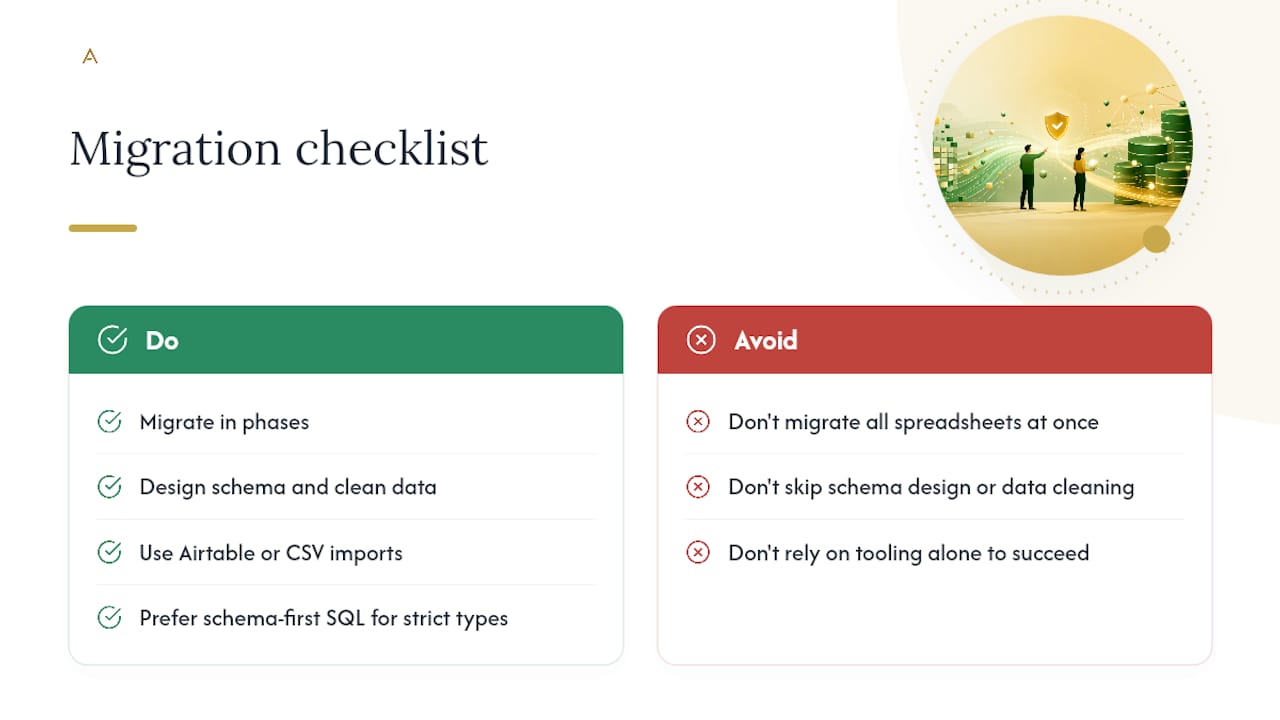
The real cost drivers aren't the import itself. Schema design, data cleaning labor, any tooling licenses, integration work with your CRM or accounting software, and building a rollback plan all eat more time than the mechanical transfer. A phased migration, moving one table or department at a time, tends to reduce both risk and total cost versus a single big-bang cutover.
What Happens Operationally After the Migration?
The database needs an owner, not just an installer. Set a backup schedule, assign access roles, add indexes to the fields you query most often, and monitor for data quality regressions in the weeks after go-live.
Keep automation logic in an integration layer above the database rather than buried inside it; that keeps the schema clean and the logic auditable when something breaks.
- Set a recurring backup schedule and test restoring from it
- Assign clear owner roles for schema changes and access control
- Add indexes to your most-queried fields
- Build a lightweight change control process for schema edits
Pro Tip: A one-page SLA (who approves schema changes, who owns backups) prevents the slow drift back into "just add a column" spreadsheet habits.
How Does a Systems Studio Actually Run a Migration?
A structured migration follows a repeatable sequence, not a single tool run.
- Intake and diagnosis: audit the existing spreadsheet, interview the team using it, and identify where duplication and manual fixes actually happen.
- Schema design: build the target tables, relationships, and constraints before touching a single row of source data.
- Staged migration: move data in batches, validating each stage rather than one giant cutover.
- Validation: run row counts, integrity checks, and spot audits.
- Handover and training: document the new system and train the team that will own it day to day.
Most migration failures trace back to skipped normalization, not bad tooling. The technical work is rarely the hard part.
A manual diagnosis before automation approach, rather than defaulting straight to off-the-shelf import scripts, is what tends to separate a migration that holds up in six months from one that quietly breaks.
What Schema Design Choices Matter Beyond the Initial Tables?
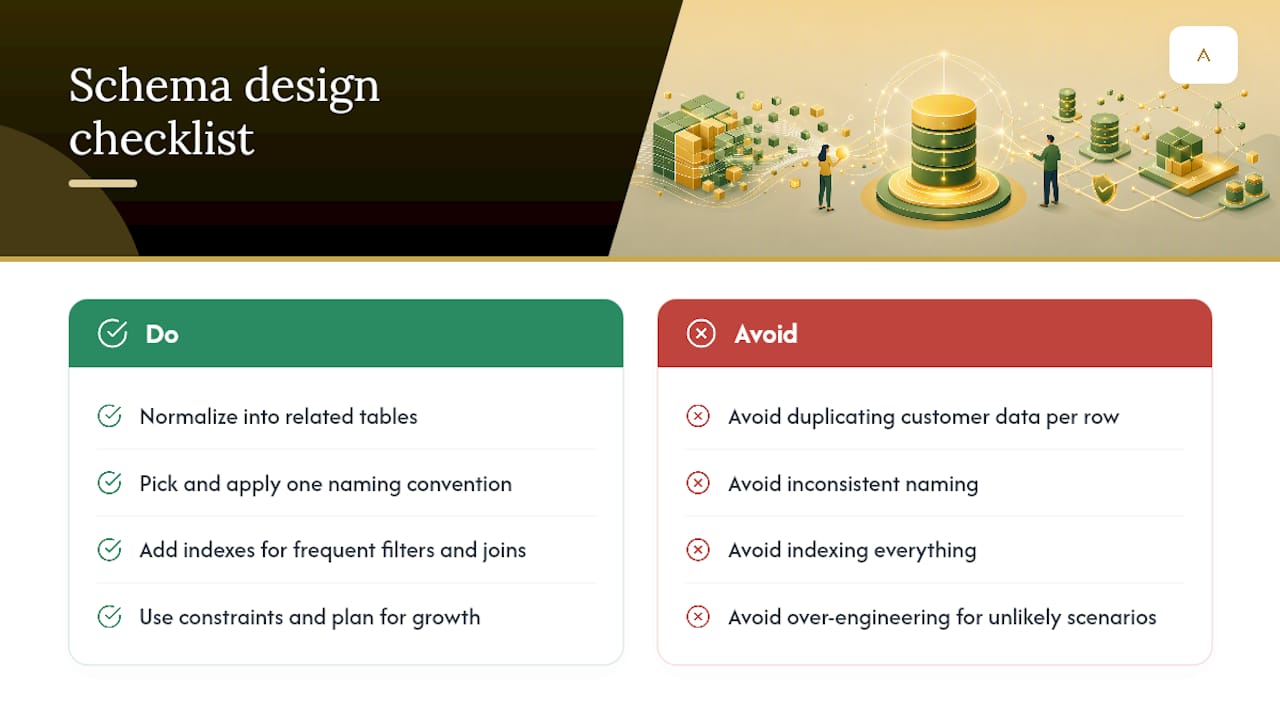
A working CREATE TABLE statement is the starting line, not the finish. Normalization, splitting data into related tables instead of one flat sheet, prevents the exact duplication problem you migrated to escape. If "customer name" and "customer address" repeat on every invoice row, you haven't left the spreadsheet mindset behind; you've just moved it into SQL.
Naming conventions matter more than they seem to at first. Pick one convention (snake_case, for instance) and apply it everywhere, since inconsistent naming turns every future query into a guessing game. Indexes deserve early thought too: add them to columns you filter or join on frequently, but resist indexing everything, since each index adds write overhead.
Constraints do the enforcement work a spreadsheet never could. Foreign key constraints stop orphaned records before they happen. Check constraints can reject an invalid status value at the database level instead of relying on someone remembering the rules. And plan for growth: a schema that works at 5,000 rows can slow down badly at 500,000 if you skipped indexing or chose the wrong data types up front.
Treat schema design as a living document. As the business adds services or product lines, new tables and relationships will follow. Building in that flexibility, without over-engineering for scenarios that may never happen, is what keeps a database useful for years instead of needing a second migration in eighteen months.
A practitioner's take on what actually goes wrong
What I see most often isn't a failed import. It's a schema built in an afternoon that quietly recreates the spreadsheet's duplication problem in SQL form. The quick wins for most SMBs come from fixing that structure before writing a single line of automation.
How Aerelion Systems Approaches a Migration Project
If you've read this far, you already know the mechanical part of migration, exporting a CSV, running an import wizard, isn't where projects go wrong. The schema design and data cleaning are where the real effort belongs, and that's exactly where a scoped, manual diagnosis pays for itself versus guessing your way through a template.
Aerelion runs a diagnostic teardown before recommending anything, mapping where your spreadsheet is actually costing you hours and what a target schema should look like for your specific operation. From there, the studio builds:
- A diagnostic teardown of your current spreadsheet workflow
- Custom schema design matched to how your business actually operates
- Import scripts built for your specific data, not a generic template
- An integration layer connecting the new database to your CRM, calendar, or accounting tools
- Training and handover so your team owns the system, not a vendor
If your spreadsheet has turned into a daily source of friction, a scoped diagnostic is the fastest way to find out what a proper migration would actually take. Get in touch with Aerelion to scope your next step.
Frequently Asked Questions
Is Airtable a database or a spreadsheet? Airtable sits between the two. It offers relational features like linked records and field types, but it's more accessible than a full SQL Server setup, making it a reasonable middle step for small teams not ready for a full database migration.
How do I convert Excel to a database without coding? Tools like Airtable or database-backed apps connected to Google Sheets let you import CSV data with minimal setup. For anything with strict types or complex relationships, though, a proper schema-first SQL approach still holds up better long term.
What's the biggest risk in spreadsheet to database migration? Skipping schema design and data cleaning. Practitioners consistently point to maintenance and normalization problems, not tooling choice, as the main reason migrations fail after launch.
Should I migrate all my spreadsheets at once? No. A phased approach, moving one table or department at a time, reduces risk and makes validation manageable compared to a single large cutover.
Do I need SQL Server specifically, or will any database work? Microsoft SQL Server and Azure SQL Database are common choices for SMBs already in a Microsoft ecosystem, but the schema-first principles apply regardless of which database engine you choose.
Sources
- Import data from Excel to SQL Server or Azure SQL Database
- Migrating Spreadsheets to Databases: Format Considerations
- Database vs Spreadsheet: When to Use Each